Feeling Overwhelmed by New Software at Work? Here's What to Do
Stuck trying to learn new software at work?
Paste a screenshot into Data Levee and get a clear explanation of what you’re looking at and what to do next.
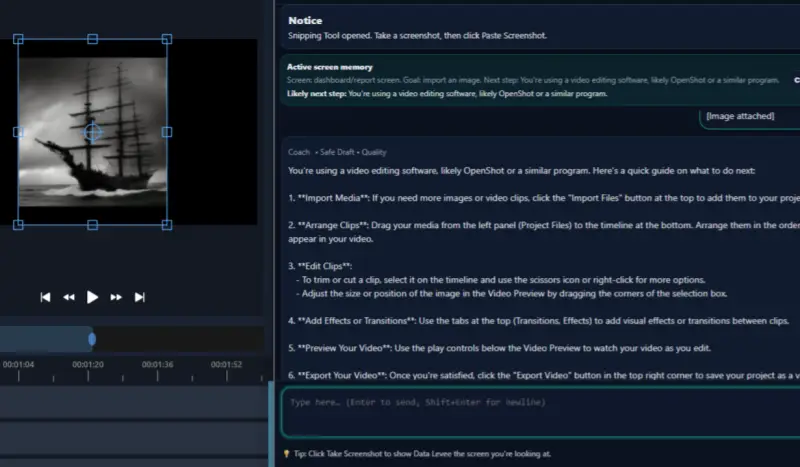
Starting a new job often means learning new systems, tools, and dashboards very quickly. For many people, one of the hardest parts of onboarding is trying to understand unfamiliar software.
If you’ve ever opened a work tool and thought:
- Where do I even start?
- What do all these buttons mean?
- Am I supposed to know how to use this already?
You’re not alone. Feeling overwhelmed by new software is extremely common, especially during the first weeks of a job.
The good news is that there are ways to make the learning process easier.
f you’re staring at a screen and don’t understand what you’re looking at, start here: Help Understanding Confusing Software Screens at Work
Why New Work Software Feels So Confusing
Most workplace software systems are designed for experienced users, not beginners.
This means new employees are often expected to understand things like:
- dashboards
- ticket systems
- internal tools
- project management software
without much explanation.
At first, the interface can look like a wall of unfamiliar buttons, tabs, and menus.
This confusion isn’t a sign that you’re doing something wrong. It’s simply part of learning how a company’s workflow works.
Start by Understanding the Goal of the Tool
Instead of trying to understand every button at once, start with a simple question:
What is this tool meant to accomplish?
For example:
- A ticket system tracks tasks or issues.
- A dashboard shows project metrics or data.
- A CRM tracks customers and interactions.
Once you understand the purpose of the system, the features start to make more sense.
Focus on the Task, Not the Entire System
One common mistake new employees make is trying to learn the entire software platform at once.
In reality, most roles only use a small portion of the system.
Instead of exploring everything, focus on:
- the screen you are currently working in
- the task you were assigned
- the next action required
This keeps the learning process manageable.
Break Confusing Screens Into Smaller Pieces
When looking at an unfamiliar screen, try identifying:
- the main menu or navigation
- the primary action buttons
- the status indicators
- the information panels
Understanding these pieces can quickly turn a confusing interface into something more understandable.
Ask Clear Questions When You’re Stuck
If you truly don’t understand a system, it’s better to ask focused questions rather than struggle silently.
For example:
- What does this status mean?
- Where do I update progress on this task?
- Which field am I supposed to change?
Clear questions help coworkers guide you faster.
Remember: Everyone Was New Once
Even experienced employees once had to learn the same tools from scratch.
Many people feel pressure to understand everything immediately, but most workplaces expect a learning period.
The key is to keep focusing on the task in front of you, rather than the entire system.
When Software Screens Still Feel Confusing
Some workplace tools are complicated, and it’s normal to need help interpreting what you’re seeing.
Tools like Data Levee are designed to help workers understand unfamiliar software screens and tasks by explaining what’s happening on the screen and helping draft clear work updates when needed.
This can make learning new systems much less stressful during the first weeks of a job.
Related guides
How to Learn New Software at Work (Without Feeling Lost)
What Is a Ticket in Jira? (Simple Explanation for New Employees)
How to Write a Status Update at Work
Beginner’s Guide to Understanding Workplace Software