Overwhelmed by New Software at Work? Here’s How to Get Unstuck
Stuck trying to learn new software at work?
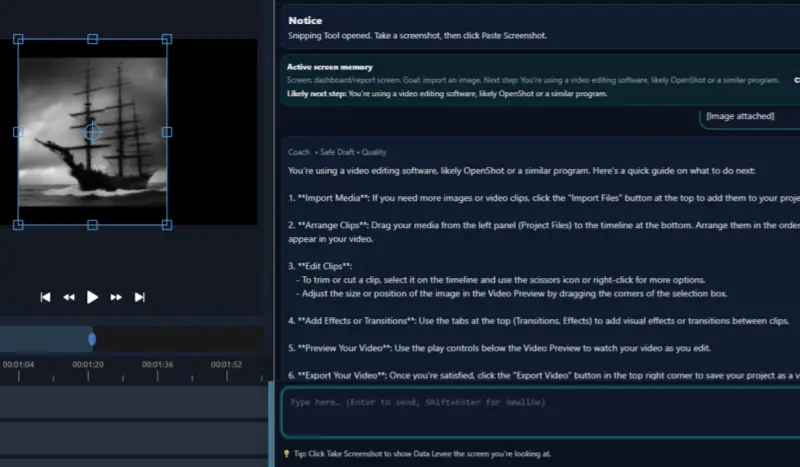
Paste a screenshot into Data Levee and get a clear explanation of what you’re looking at and what to do next.
Starting a new job or learning a new system can feel overwhelming. Many employees suddenly find themselves staring at unfamiliar software, trying to understand dashboards, menus, workflows, and tasks they’ve never seen before.
If you feel lost when learning new software at work, you’re not alone. Nearly everyone experiences this at some point, especially when companies use complex internal systems or tools that were never designed to be easy to learn.
The good news is that there are practical ways to get comfortable with new software much faster.
Related Links
Related guides
Beginner’s Guide to Understanding Workplace Software
How to Learn New Software at Work (Without Feeling Lost)
Why New Software Feels So Confusing
When you're introduced to unfamiliar software, your brain is trying to process several things at once:
- new terminology
- unfamiliar menus and buttons
- company-specific workflows
- instructions that assume prior knowledge
Most workplace tools were built by engineers for internal use, not for beginners. That’s why many employees feel overwhelmed when trying to understand a new system at work.
The key is to break the learning process into small steps instead of trying to understand everything at once.
Focus on Understanding the Screen First
When you're learning new software, start by understanding what you're actually looking at.
Ask simple questions like:
- What is this page trying to show me?
- What task is this screen asking me to complete?
- Which buttons actually matter for my job?
Instead of clicking randomly, focus on identifying the purpose of the screen. Once you understand what the system expects you to do, everything becomes much easier.
Take Screenshots of Confusing Software
One of the fastest ways to understand unfamiliar software is to capture what you’re seeing.
Take a screenshot of the screen or tool that’s confusing you and review it step-by-step.
Looking at the screen outside the pressure of the moment helps you spot things you might have missed while working.
It also makes it easier to ask clear questions when you need help.
Ask Better Questions When You're Stuck
A common mistake people make when learning new software is asking questions that are too broad.
Instead of asking:
“I don’t understand this system.”
Try asking something specific like:
“What does this button do in this part of the workflow?”
“What does this field mean in this ticket?”
Specific questions get faster answers and help you understand the system much quicker.
Tools That Help Explain Unfamiliar Software
Sometimes the fastest way to understand new software is to have help interpreting what you're looking at.
Tools like Data Levee allow you to paste a screenshot of a confusing screen and ask questions about it. The system can help explain what the interface is showing and help draft clear responses or updates while you're still learning the workflow.
This can make it much easier to understand unfamiliar tools and communicate professionally while you’re getting comfortable with a new system.
Learning New Software Takes Time
Every professional has faced the moment where they feel overwhelmed by new software at work.
The important thing to remember is that confusion is part of the learning process. By breaking the system down, focusing on what each screen is doing, and asking better questions, you’ll gain confidence much faster than trying to understand everything at once.
With the right approach—and the right tools—you can turn confusing software into something you understand and use confidently every day.
If you're trying to get comfortable with unfamiliar tools, you may also find this guide helpful: How to Learn New Software at Work.
Related Links
Related guides
Beginner’s Guide to Understanding Workplace Software
How to Learn New Software at Work (Without Feeling Lost)