How to Learn Company Software Quickly.
Stuck trying to learn company software quickly?
Paste a screenshot into Data Levee and get a clear explanation of what you’re looking at and what to do next.
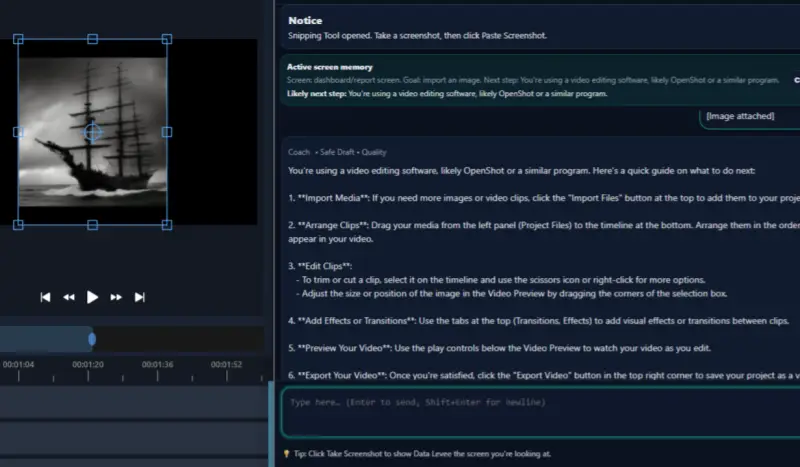
Most workplace systems are designed for teams that already understand the process behind the software.
When a new employee begins using the system, the software may include:
- unfamiliar terminology
- dashboards with unexplained data
- ticket systems with brief instructions
- multiple menus and navigation options
- workflows that assume background knowledge
Without context, even a simple task can feel confusing.
The challenge is not the worker’s ability. It is simply that the system takes time to understand.
Related Guides
If this topic sounds familiar, these guides may also help:
- How to Learn New Software at Work (Without Feeling Lost)
- Beginner’s Guide to Understanding Workplace Software
- How to Understand a Software Screen
- Data Levee
Steps That Help You Learn Company Software Faster
If you want to learn workplace systems more quickly, it helps to approach the process step by step.
Focus on the most common tasks first
Instead of trying to learn the entire system, focus on the tasks you perform most often. Understanding those tasks will make the rest of the software easier to learn.
Pay attention to how information flows
Many systems follow a pattern: tasks are assigned, progress is tracked, and updates are recorded. Understanding this flow helps make sense of the interface.
Look for patterns in the system
Most workplace software uses similar concepts such as statuses, dashboards, tickets, or reports. Recognizing these patterns makes it easier to understand new screens.
Learning Software Is Part of Modern Work
Many employees feel pressure to learn new systems quickly.
However, learning workplace software is a normal part of starting a job. Even experienced professionals often need time to understand a company’s internal tools.
If you have ever opened a system and thought:
“I need to learn this fast.”
you are not alone.
If you want a deeper strategy for understanding unfamiliar tools, read How to Learn New Software at Work (Without Feeling Lost).
How Data Levee Helps Workers Learn Software Faster
Data Levee helps workers understand unfamiliar workplace software, screens, and tasks.
Instead of trying to guess how a system works, employees can use Data Levee to better understand dashboards, tickets, and instructions inside workplace tools.
This can help workers:
- interpret unfamiliar software screens
- understand tasks and tickets
- identify the next step in a workflow
- draft clearer updates about their work
When the software becomes easier to understand, employees can focus more on completing their work rather than trying to decode the system.
Learning Workplace Systems Takes Time
Many people assume they should understand new software immediately when starting a job.
In reality, most workplace tools take time to learn.
With practice, observation, and the right guidance, unfamiliar systems gradually become easier to navigate.
If you want a broader explanation of how workplace tools work, start with Beginner’s Guide to Understanding Workplace Software.
Related Guides
If this topic sounds familiar, these guides may also help:
- How to Learn New Software at Work (Without Feeling Lost)
- Beginner’s Guide to Understanding Workplace Software
- How to Understand a Software Screen